My blog has moved!

You will be automatically redirected to the new address. If that does not occur, visit
http://ysquarec.blogspot.com
or replace this permalink, from y--square to ysquarec.

Showing posts with label Computer programming. Show all posts

10/26/2010

Sorting using C++ in both ascending and descending order

When I am doing a home work research on this topic, I found very little help from the net and all scatted around. So, I wanna publish it to share with you guys.
There are 4 sorting technique I wanna discuss here. Note that, I get the information from the internet and then compile it.

Bubble sort:

bublle sort

Bubble sort coding

Selection sort:
Selection sort

Photobucket

Insertion sort:
Insertion sort

Insertion sort coding

Quick sort:
Quick sort

Quick sort coding

Because I had an assignment/experiment to complete a C++ coding with the output as below, that is why I started to search all these thing.
Photobucket


You can download the coding from here
and the experiment report here
It will be extremely beneficial to my junior (I guess so) and for those for wants a one stop information for sort using C++.
10/27/2009

Creating a simple GUI by using programming

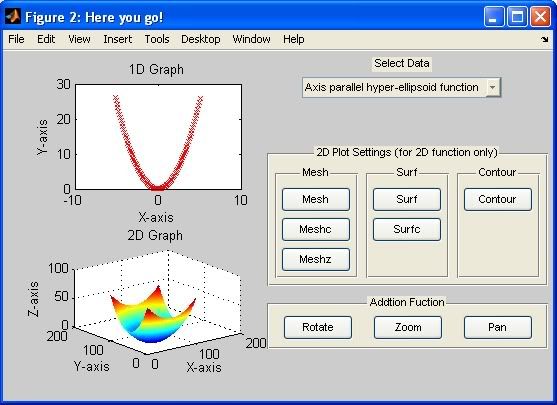
I just finish a GUI assignment. I learn a lot from there. Most of my friends, using GUIDE's drag and drop method to do, but I think that is stupid. I mean, when you use GUIDE, do you really understand the programming created by it? GUIDE produces 2 files (M-File and FIG file) then link it together by complicated programming language. If you are like, a master or PHD student currently researching about that or you are the creator of MATLAB, ok, then fine. Bravo to you. But if you are a undergraduate like me, you really should try creating a GUI by programming. This is my paper, and you might consider reading the abstact before download my report and the GUI's M-file....

ABSTRACT

The assignment introduce a new function in Matlab which is Graphical User Interface (GUI). There are 2 way in creating a GUI i.e. using GUIDE or manual programming. GUIDE provides a drag and drop interface to the programmer to design the GUI layout while creating 2 file i.e. M-file and FIG file to stores both programming and layout. This Assignment, however, uses the another way of creating GUI, i.e. by plain (manual) programming. The difference between programming a GUIDE created program and manually program GUI is that a manually programming created GUI needs a position declaration in every layout button (character), which is not needed in GUIDE created M-file. This assignment shows the way to derive a 1D and 2D function from a summation equation, The same method can be use at a higher level or dimension. This GUI uses, static text, popup menu, panel, bush button and toggle button as user interface control.

Feell interested?
Click here to download the report.
And here to download the M-file.

Here is the layout of the GUI


updated on 8 Jan 2010

6/06/2009

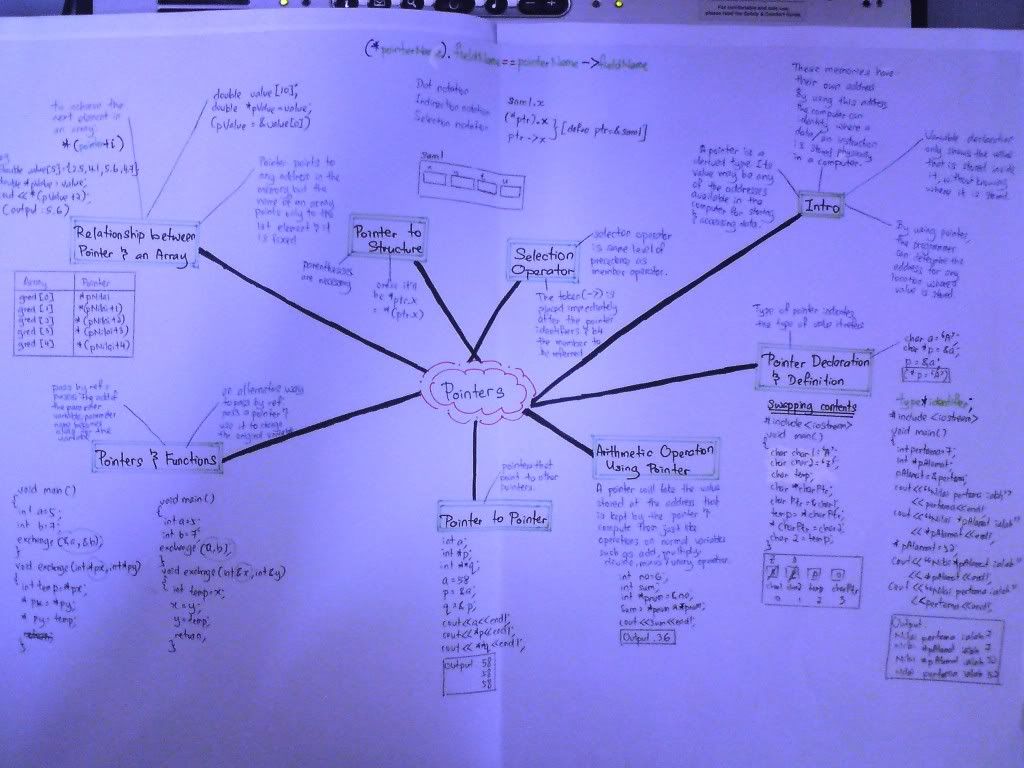
Computer Programming (notes + mindmap)

I collect my computer programming notes for novice to refer. I am currently studying Engineering, so the syllabus is base on engineering course, not IT (information technology). Basically, engineering student are taught to computer programming, must the language C++ only. Thus, other language such as C or C# can also taught, depends to the University requirement, coz the objective is to let engineering student get expose to programming to assist them in their future software usage such as mathlab, mapel etc.
P/S: syllabus may varies due to different university and country.

Chapter 1 : Introduction to Computer & Programming Language
Chapter 2 : Introduction to C++
Chapter 3 : Problem Solving
Chapter 4 : Introduction to The C++ Language
Chapter 5 : Control Technique - Selection & Switch
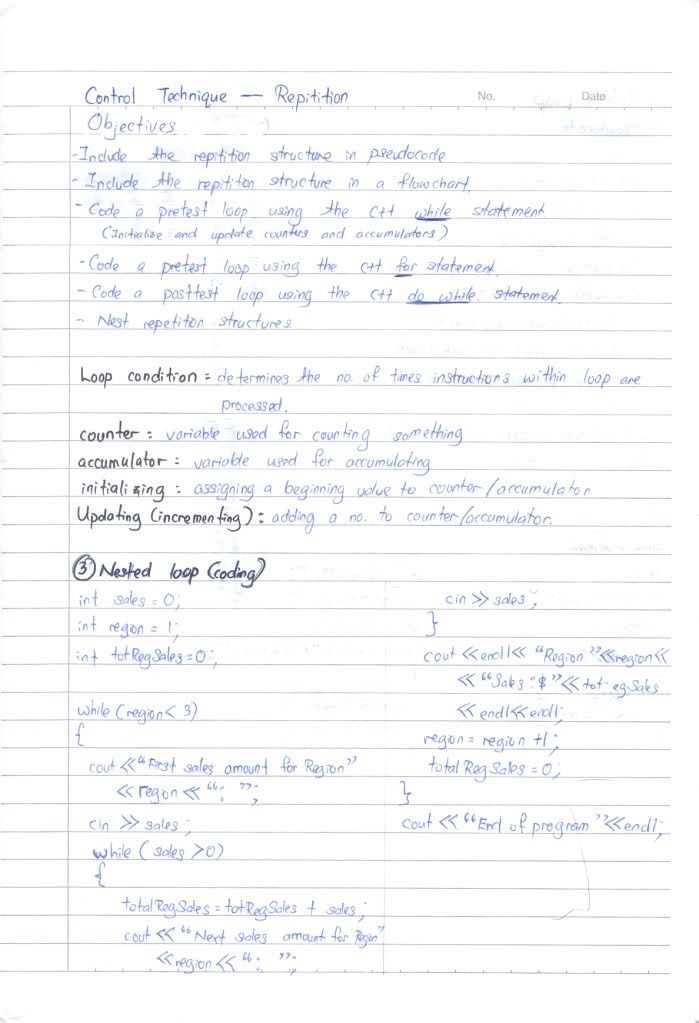
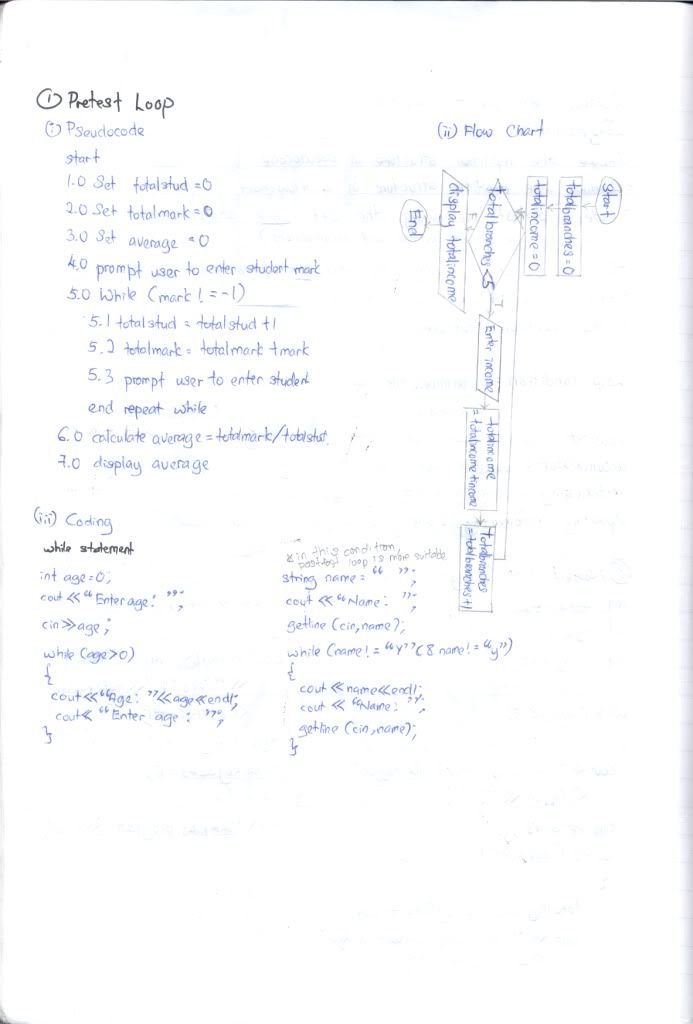
Chapter 6 : Control Technique - Repitition
Chapter 7 : Function (Part I)
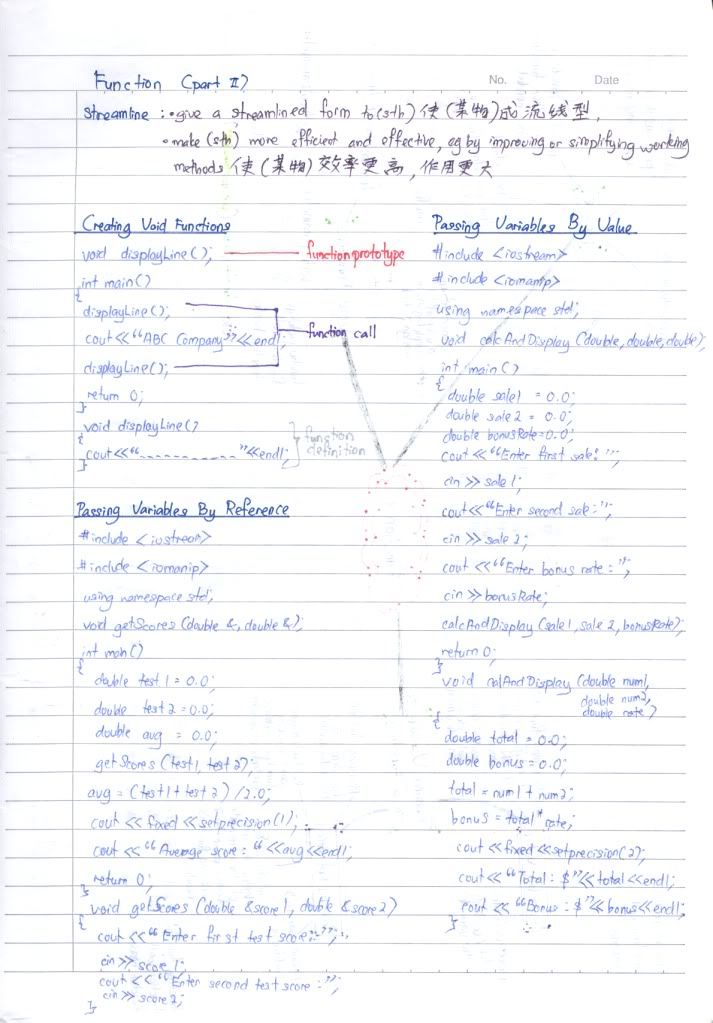
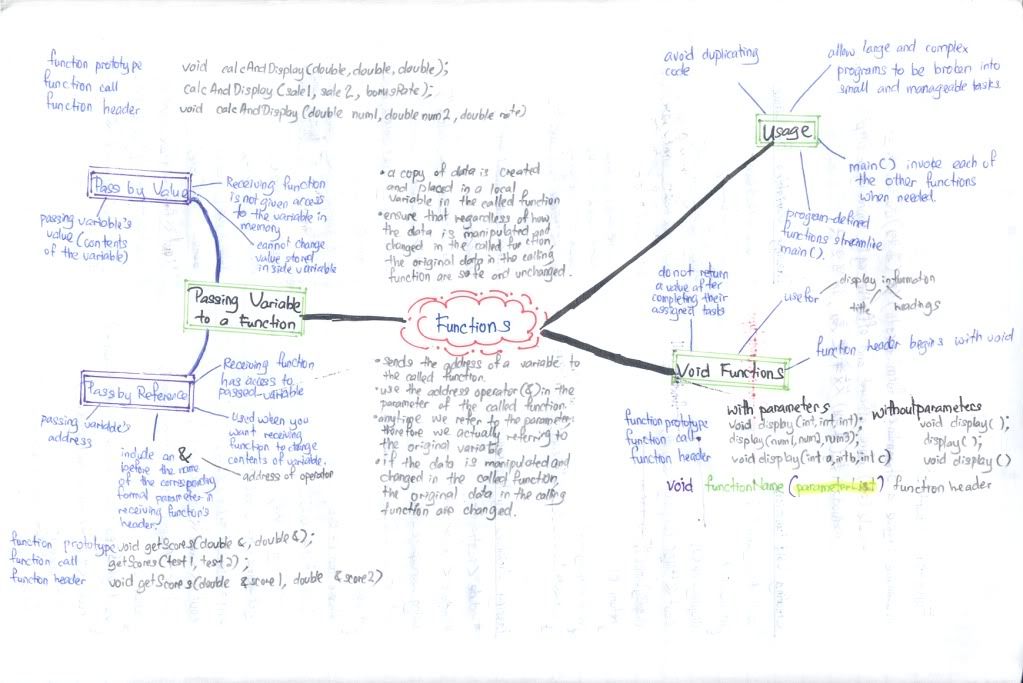
Chapter 8 : Function (Part II)
Chapter 9 : Array (Part I)
Chapter 10 : String Manipulation
Chapter 11 : Array and Function
Chapter 12 : Input Output File
Chapter 13 : Enumerated
Chapter 14 : Structure
Chapter 15 : Pointers
Tips: Click on the title to view the notes and mind map.

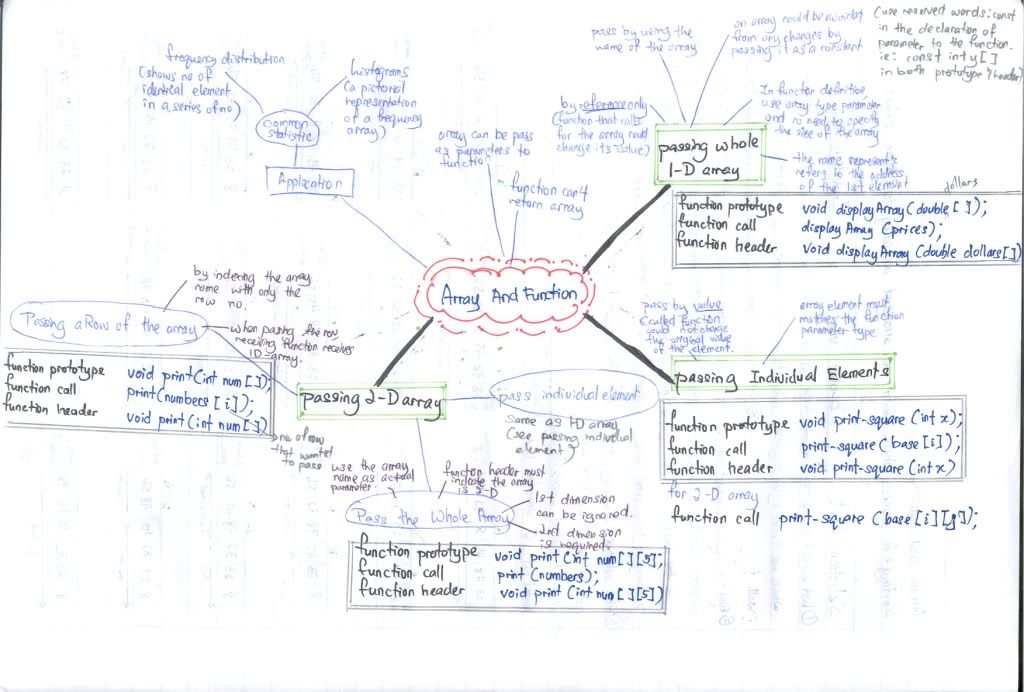
Array and Function

Computer Programming (Chapter 11)


Comment:
1.Put more effort on passing the array (lol... this chapter talks all about passing the array), ok maybe I should say put more effort on the syntax, it will drive you crazy.
Suggestion:
1.Click on the pic i.e. notes and mind map for a larger view and it's URL.

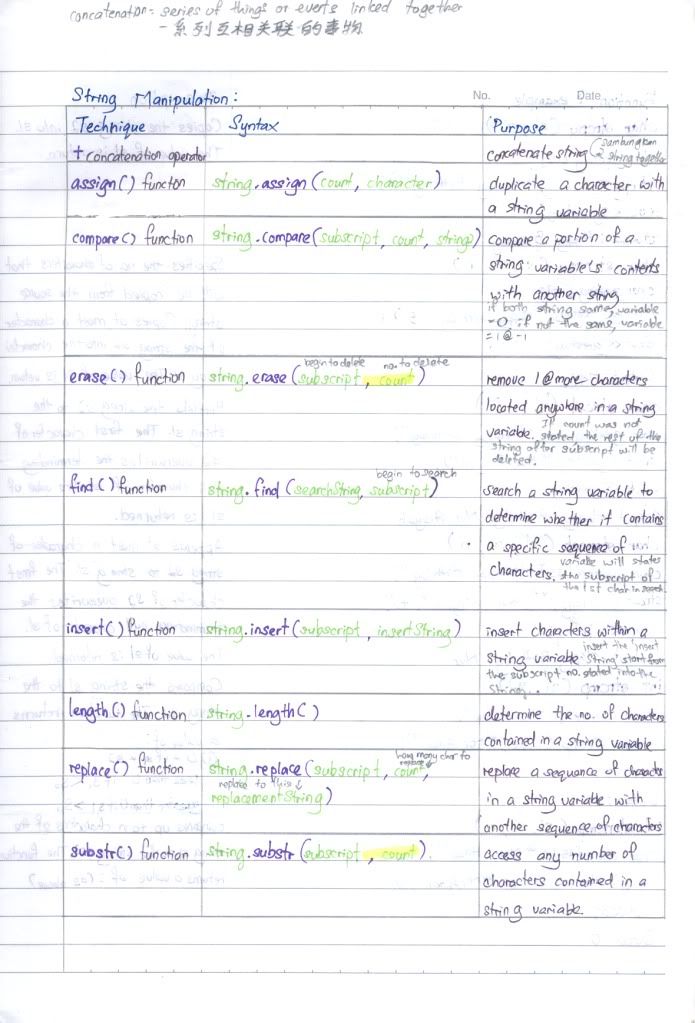
String Manipulation

Computer Programming (Chapter 10)


Comment:
1. Good luck to you. I never remember anything in this chapter. Luckily my uni have not test us about this chapter. However if you use it in your project, you teacher may give you an extra credit *wink*.
Suggestion:
1.Click on the pic i.e. notes and mind map for a larger view and it's URL.

6/05/2009

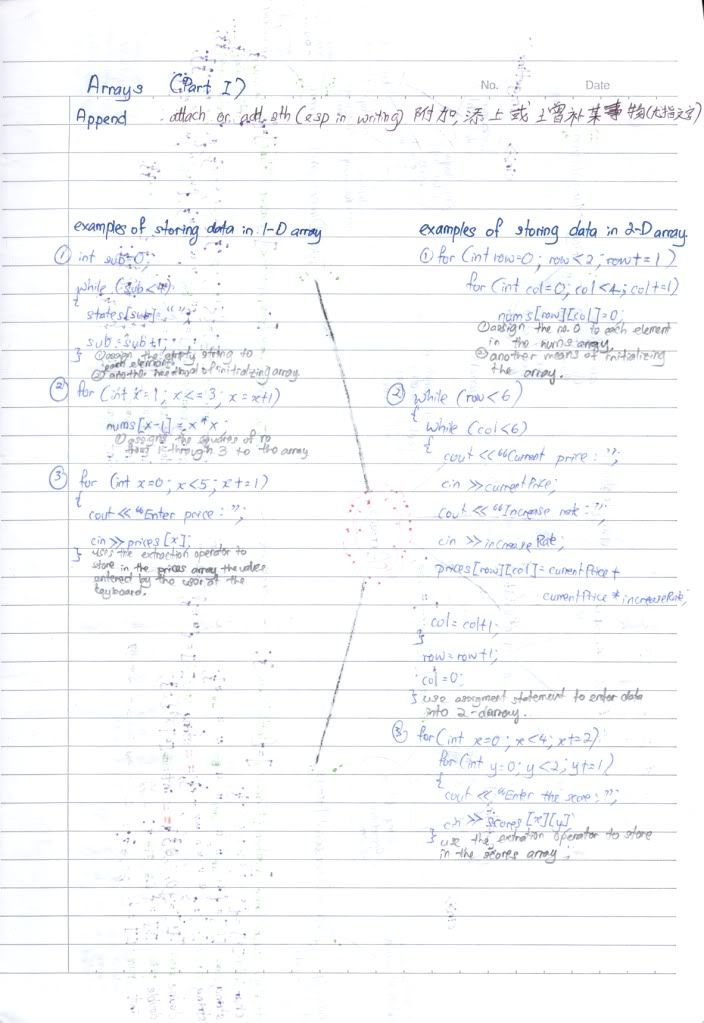
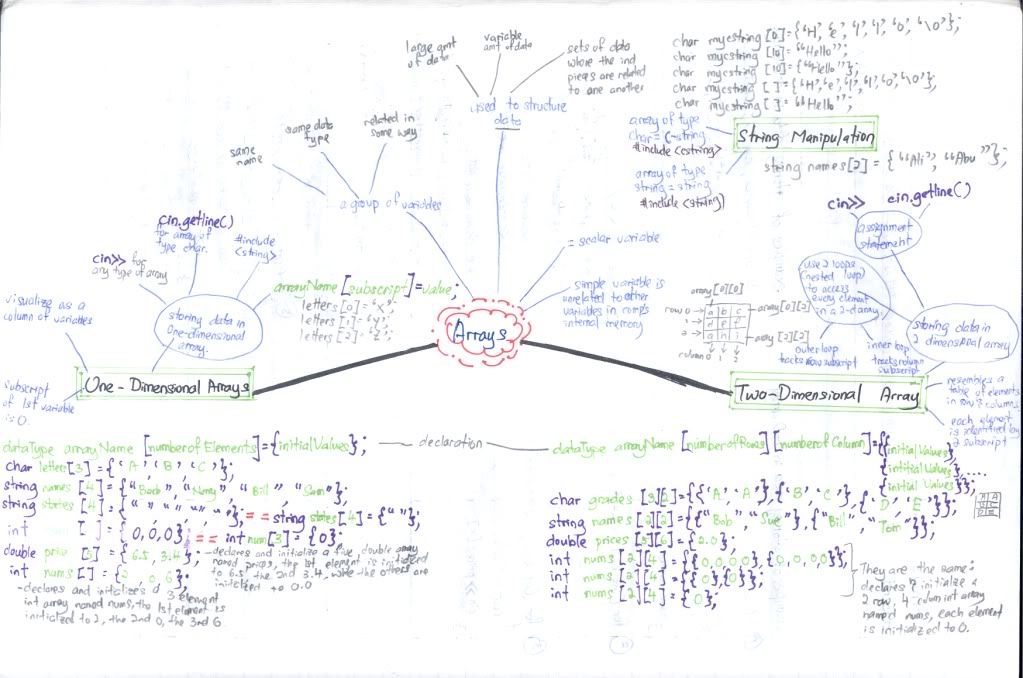
Array (Part 1)

Computer Programming (Chapter 9)


Comment:
1.Array is sort like matrices but actually matrices is just a kind of array.
2. Like function, the variable can be define in the parameter.
3. Engineering student only needs to learn until 2 dimensional array. I am not so sure about IT's student.
Suggestion:
1.Click on the pic i.e. notes and mind map for a larger view and it's URL.

Function (Part 2)

Computer Programming (Chapter 8)


Comment:
1.Put more effort on Pass by value and pass by reference.
2. When a value is pass by value, the operation in the function can not change the value stored. However, pass by reference has access to the passed variable.
Suggestion:
1.Click on the pic i.e. notes and mind map for a larger view and it's URL.

Function (Part 1)

Computer Programming (Chapter 7)


Comment:
1.This is not the hardest chapter in the subject but most student got confused start from this topic and drag the unknown to the end.
2. Don't use too much of global variable or else it will slows your program down.
3. Student always mistakenly use variable name as function name. Must avoid it.
4. Variable can be define in the parameter list, so that you don't have to redefine it again.
5. Function prototype must end with semicolon, but function header should not have any semicolon ( it will have curly bracket *winks*)
Suggestion:
1.Click on the pic i.e. notes and mind map for a larger view and it's URL.

Control Technique - Repitition

Computer Programming (Chapter 6)


Comment:
1.Both pseudocode and flow cart is important (applicable) in designing a repitition program (for selection and switch also) but I personally prefer flow chart coz it is easier in seeing the big picture. It tells you what you should do next in a simple and tidy format.

Suggestion:
1.Click on the pic i.e. notes and mind map for a larger view and it's URL.
2.When you want to start a nested program, you have to start with a { , right? Remember to end it with a } also. I would advise you to type both { and } before starting the inner program then jump back inside the curly bracket to start program. This decrease the probablity of forgetting the ending curly bracket }.

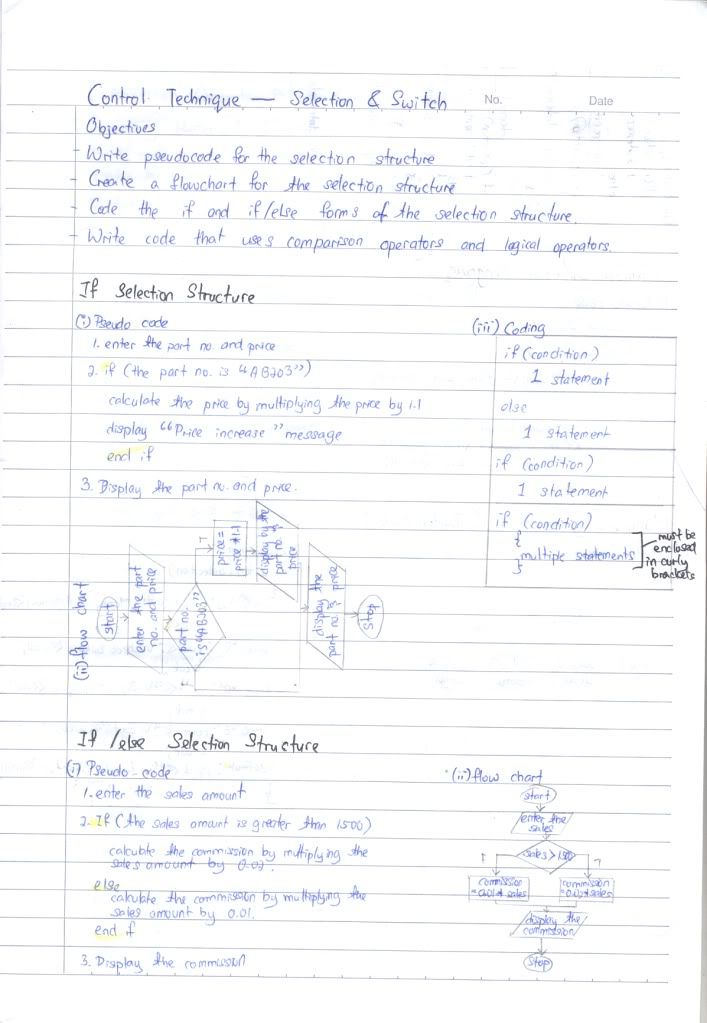
Control Technique - Selection & switch

Computer Programming (Chapter 5)


Comment:
1.Both pseudocode and flow cart is important (applicable) in designing a selection and switch technique but I personally prefer flow chart coz it is easier in seeing the big picture. It tells you what you should do next in a simple and tidy format.
2. If should ends with end if.
3. Switch case seems to be complicated and can be substitute by else if, but in some condition, switch case is a must. Remember that most of you still have theory exam other than lab test!
Suggestion:
1.Click on the pic i.e. notes and mind map for a larger view and it's URL.
2.When you want to start a nested program, you have to start with a { , right? Remember to end it with a } also. I would advise you to type both { and } before starting the inner program then jump back inside the curly bracket to start program. This decrease the probablity of forgetting the ending curly bracket }.

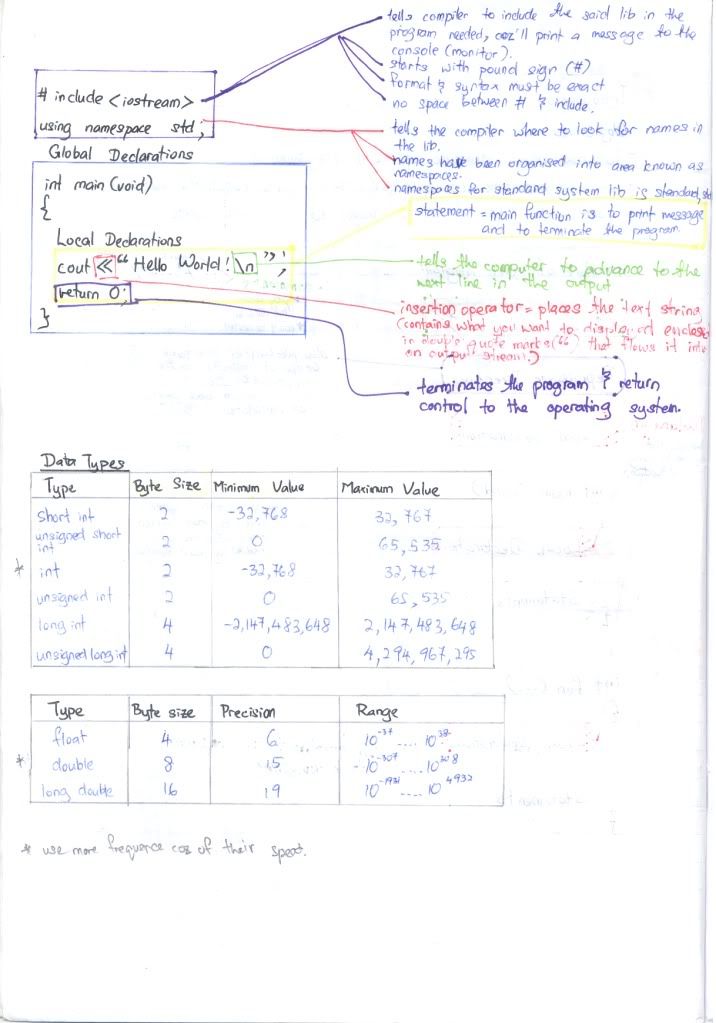
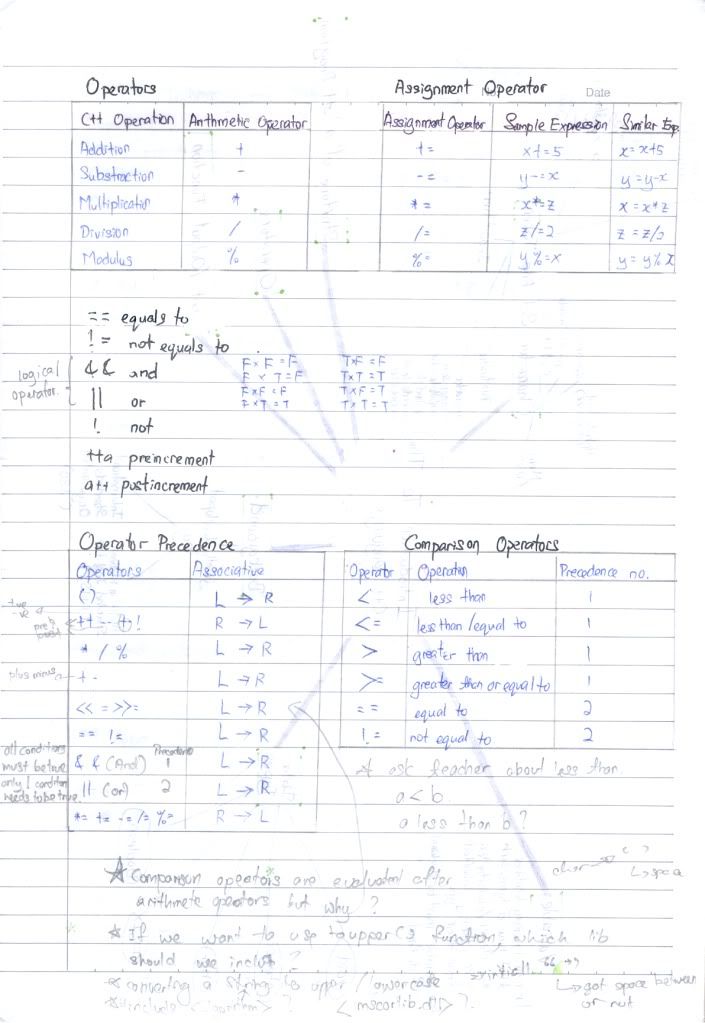
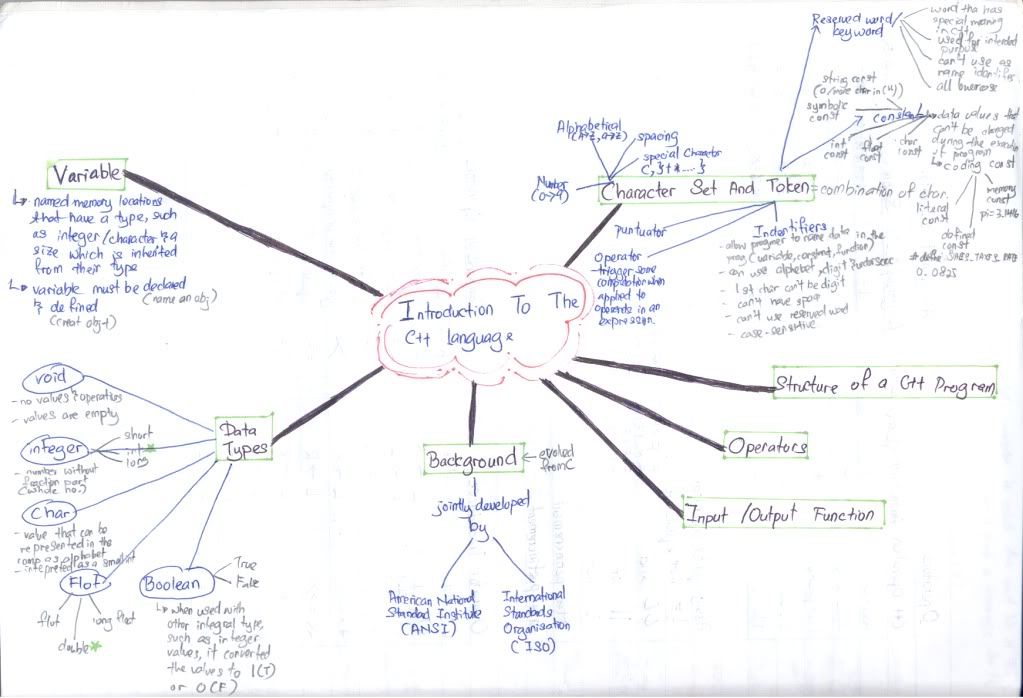
Introduction to the C++ language

Computer Programming (Chapter 4)


Comment:
1. Put more effort on operators, assignment operator, operator precedence and comparision operators .
2. Precedence is most important in this chapter.
3. Use more int and double coz it is fastest. Last time short is use more often coz it takes less space, but nowaday, memory is not a problem already but speed and performance. When you test, you may found out that it has not much differences, but when you try in a very long program, the compiler will jam (lag).
Suggestion:
1.Click on the pic i.e. notes and mind map for a larger view and it's URL.
2.If you can't remember the precedences, then you can use brackets () to group the operation that should be carry out first. However, if it you are taking theory test, then oppssss.... I can't help you with it, you should do some memory exercise.

6/01/2009

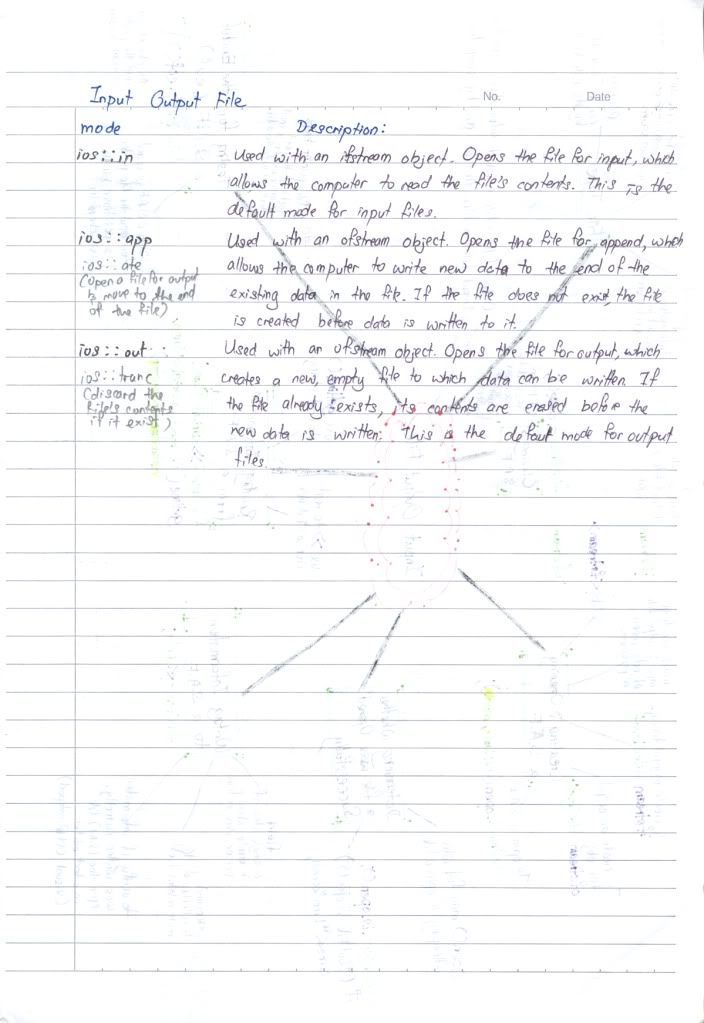
Input Output File

Computer Programming (Chapter 12)
Comment:
1. Althought there are more than 3 mode of ios, but these 3 modes are most frequent use and can substitute other ios since their fuction are almost the same.
2. I always got problem in getline function, try to avoid it since it will "eat" 1 line.
4. try to save the output file same as your programming's file as it will load and save to there.
Suggestion: Click on the pic i.e. notes and mind map for a larger view and it's URL.

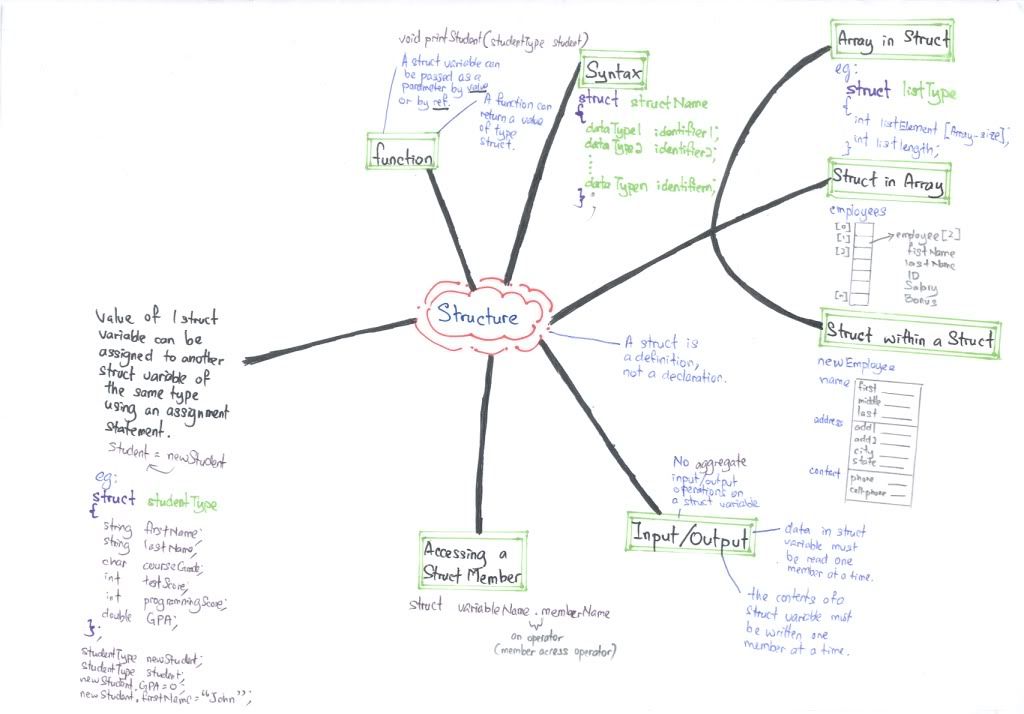
Structure

Computer Programming (Chapter 14)

Comment:
1. Put more effort on syntax .
2. Struct in a struct is acceptable.
3. Understand what it is use for then compare it with Array.
4. Do some exercise i.e. programming to enhance understanding.
Suggestion: Click on the pic i.e. notes and mind map for a larger view and it's URL.

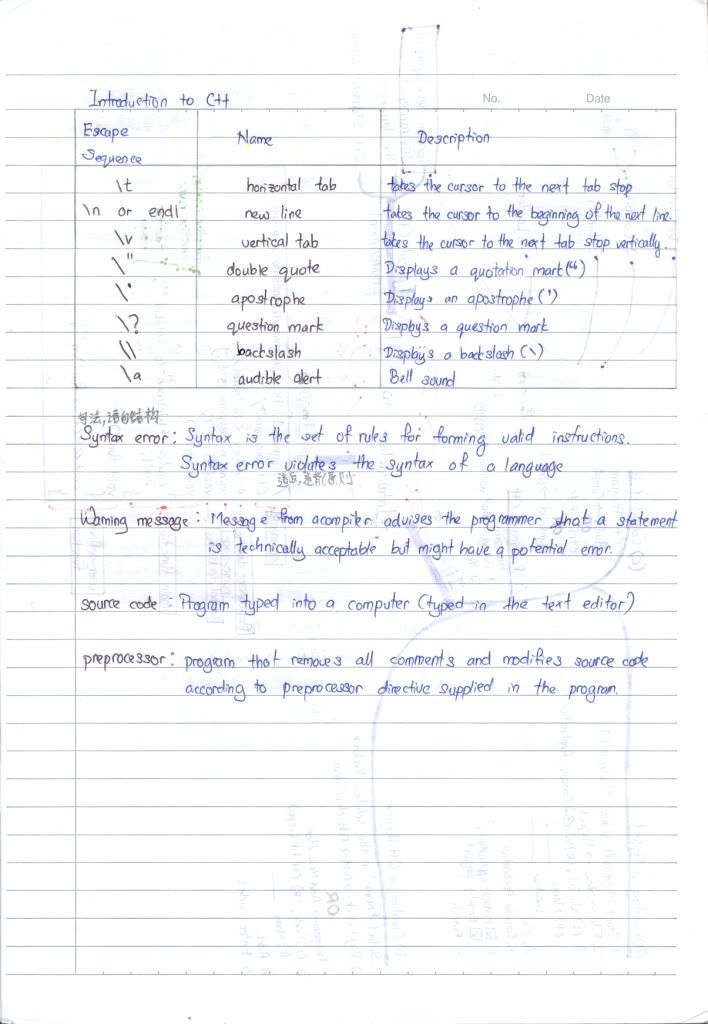
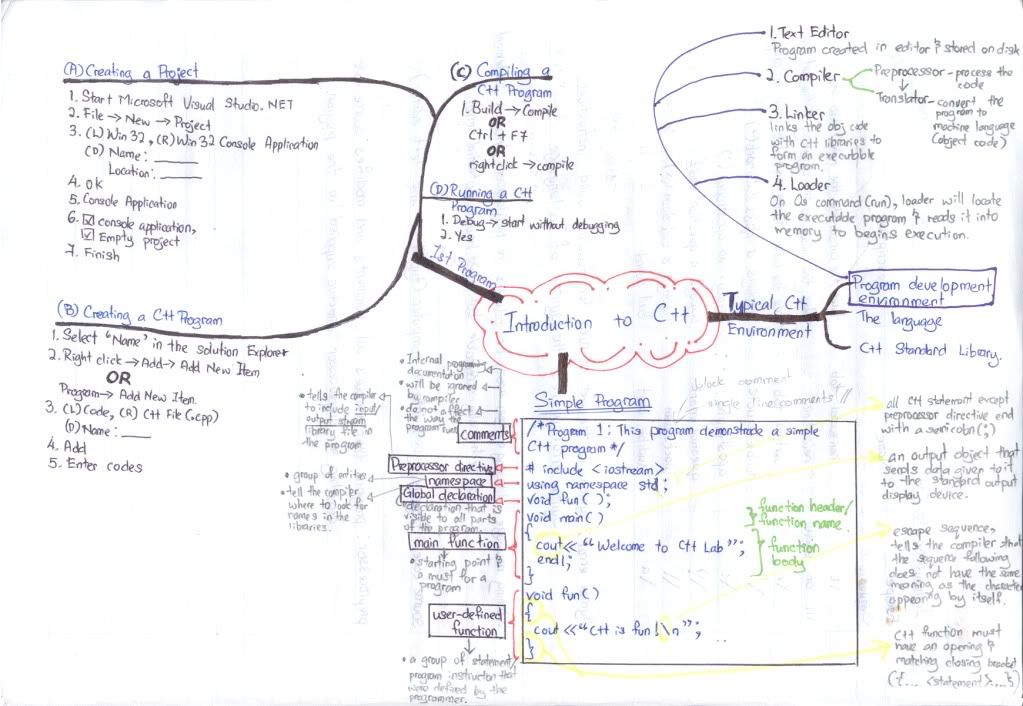
Introduction to C++

Computer Programming (Chapter 2)

Comment:
1. Understand the language's syntax. # include and using namespace std;
is a must as is it the most short and effective way to decline the library.
Suggestion: Do some exercise using the compiler. Click on the pic i.e. notes and mind map for a larger view and it's URL.

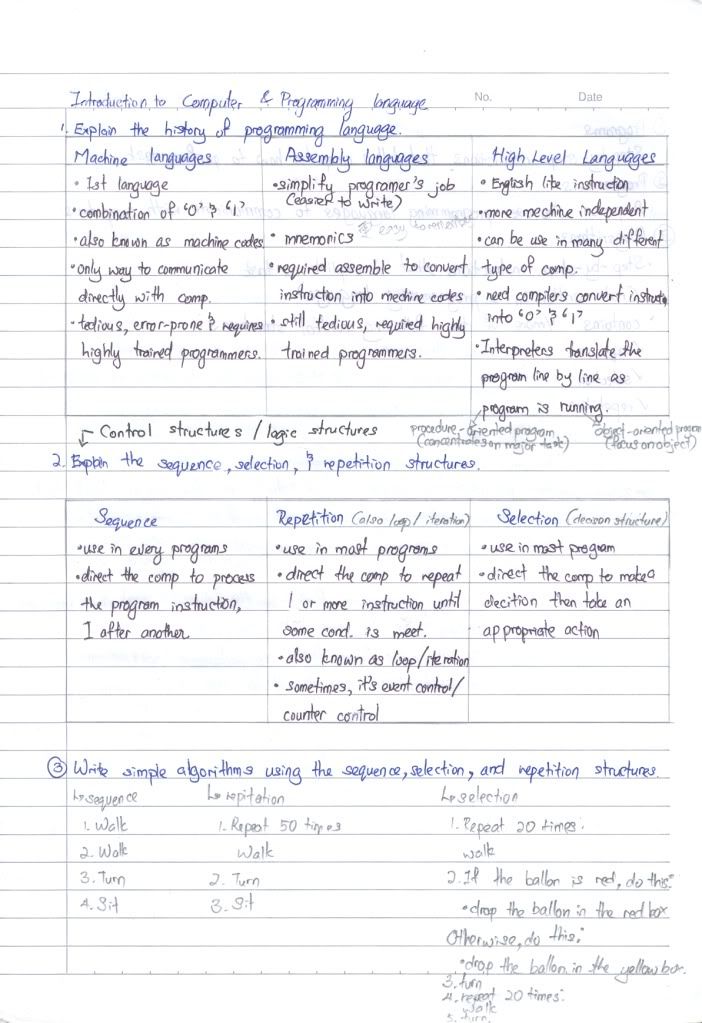
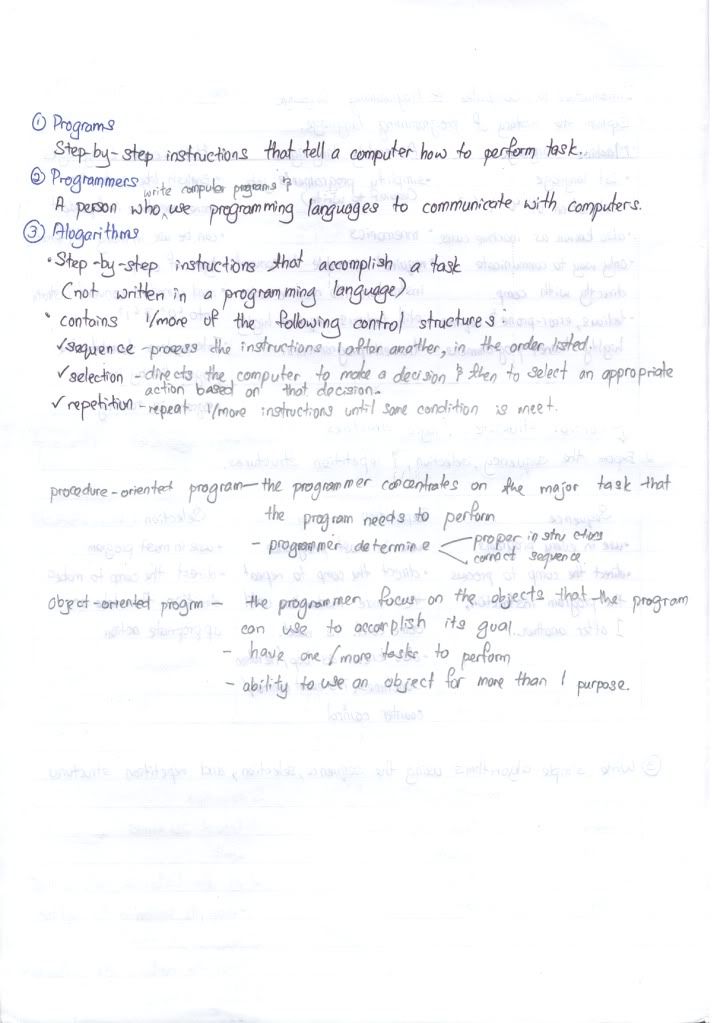
Introduction to Computer & Programming Language

Computer Programming (Chapter 1)


Comment:
1. Put more effort on history of programming languages.
2. Understand what is mean by sequence, selection, repetition, programs, programming and algorithms.
Suggestion: Remember the meaning of each word as this chapter only consist of theory. Click on the pic i.e. notes and mind map for a larger view and it's URL.

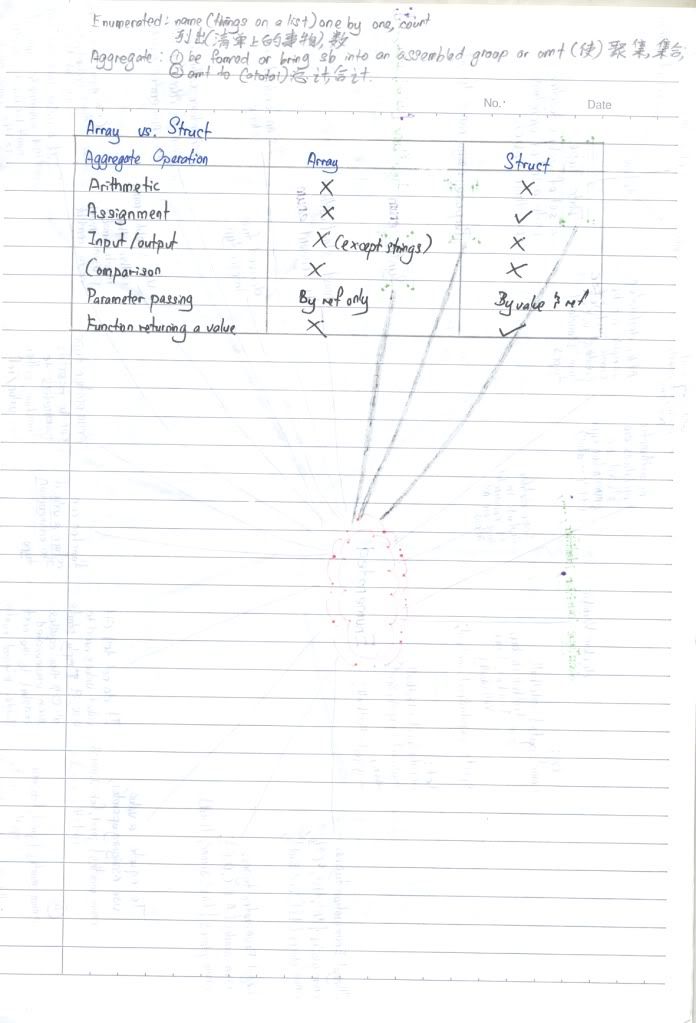
Enumerated

Computer Programming (Chapter 13)

Comment:
1. Put more effort on syntax which is enum typename{ value1, value2,...};
2. Understand what it is use for and do not confuse type name and variable.
3. Do some exercise i.e. programming to enhance understanding.
Suggestion: Click on the pic i.e. notes and mind map for a larger view and it's URL.

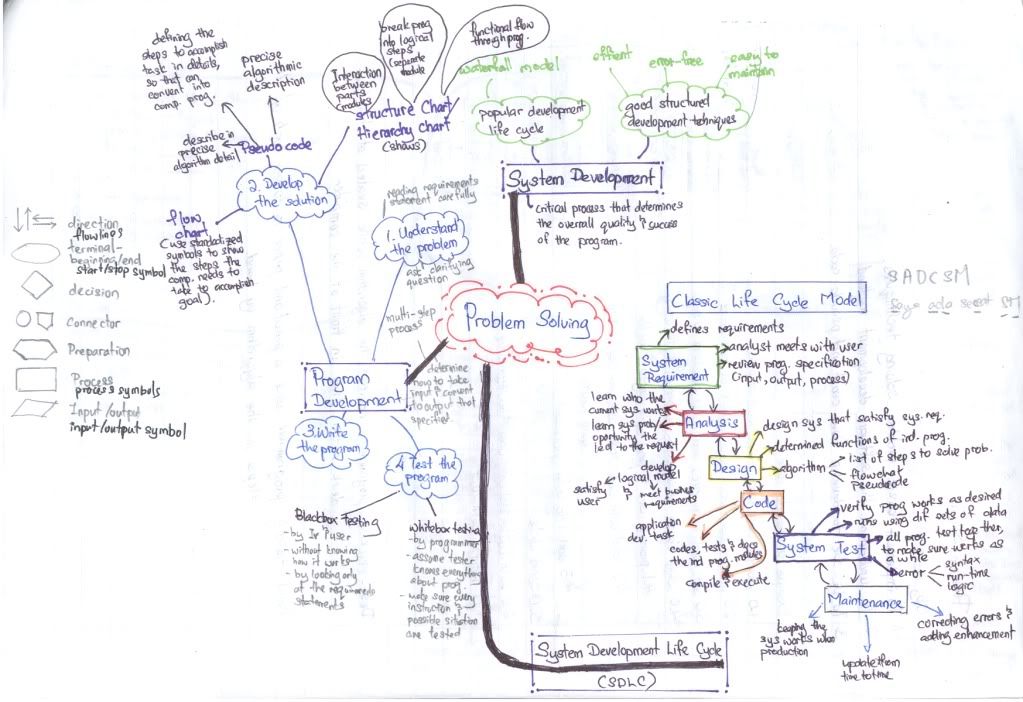
Problem Solving

Computer Programming (Chapter 3)


Comment:
1. Put more effort on Pseudo code and flow chart.
2. Understand what is desk-checking and hand-tracing.
Suggestion: Click on the pic i.e. notes and mind map for a larger view and it's URL.